Can AI build an app with login and payments?
What AI builders add for sign-in and payments in 2026, what is left to you and what to test first.
Yes. In 2026 most AI app builders can give your app sign-up, sign-in and payments from a description, with no code from you. What they cannot do is open your payment account, decide your refund rules or take responsibility for sales tax. Those stay with you, and none of them takes long.
This post explains what “login and payments” really involves, which builders include each and on which plan, and the checks worth making before the first real customer pays. Briks is one of the builders, and it is ours; its section says so.
What “login” involves
A sign-in form is the visible part. Behind it, an app with accounts needs all of these, and a good builder adds them without being asked:
- Sign-up with an email address that is confirmed, by a link sent to it, so nobody signs up as someone else.
- A way back in: a reset link for a forgotten password, sent from the app's own address.
- Other ways to sign in, such as Google or Apple, each using an app you register with that provider.
- Pages only members see, checked on every request, not just hidden from the menu.
- Roles, so staff can see what customers cannot.
- A list of accounts you can search, and a way to sign someone out everywhere.
What “payments” involves
Taking money is two systems agreeing with each other: your app and a payment processor. The buyer pays on the processor's own page; the processor then tells your app what happened, and the app records the order and opens whatever was paid for. That message back is the part that goes wrong in hand-built apps.
- One-time payments or plans that renew. Subscriptions also need cancelling, failed renewals and changes of plan.
- Test mode first. Every processor gives test keys, so you can pay with a test card before real money moves.
- Refunds and payouts happen in the processor's dashboard, not in the app.
- Sales tax. A plain processor leaves tax to you. A merchant of record, such as Paddle or Lemon Squeezy, sells on your behalf and handles the tax as the seller, for a higher fee.
- Currency. Some processors charge in the currency of your store, so the app's prices must match it.
A processor or a merchant of record?
| What differs | Payment processor | Merchant of record |
|---|---|---|
| Who sells to the buyer | You do | The merchant of record does, on your behalf |
| Sales tax and VAT | Yours to register, charge and file | Charged and paid by the merchant of record |
| Fees | Lower | Higher, as the tax work is included |
| Suits | Services, bookings, physical goods, local sales | Software, downloads and courses sold worldwide |
| Examples Briks works with | Stripe, PayPal, Mollie or Razorpay | Paddle, Lemon Squeezy, Polar, Creem or Dodo Payments |
Which AI builders include them
| Builder | Sign-in | Payments | On which plan |
|---|---|---|---|
| Lovable | Email and password or Google | Built in | Built-in payments need Pro, $25 a month |
| Bolt | Email or Google | By connecting your own account | Not stated |
| Base44 | Built in, with Google, Microsoft and Apple | Built in | Payments need Builder, $40 a month billed yearly |
| Replit | Two built-in options | Through a connector | Payments on paid plans |
| v0 | Writes sign-in code when you ask | Through an integration | Not stated |
| Bubble | Built-in user accounts | Through official plugins | A live app needs a paid plan |
| Hostinger AI Builder | Built-in user accounts | Built in | Every plan |
| Briks | Email and password by default, plus eight providers | Built in, through your own processor | Every plan; your own domain from Starter |
For prices, code export and one limit for each, see Best AI app builders in 2026.
What you still do yourself
Whichever builder you choose, the AI cannot do these for you, and each takes minutes:
- Open a payment account and pass its identity checks. Payouts go to your bank, so this is in your name.
- Choose a processor or a merchant of record. Selling software or downloads worldwide, a merchant of record saves you registering for tax in other countries. Selling services, bookings or goods, a plain processor usually costs less.
- Copy the keys from the processor's dashboard into the builder. Use the test keys first.
- Register each sign-in provider you want beside email, such as Google, in that provider's console, and paste in the callback address the builder gives you.
- Write the rules: refunds, cancellations and delivery. Your site needs them anyway, and a processor may ask to see them.
Test these before real money
An app that takes money is worth ten minutes of trying to break it. With test keys on, check that:
- A paid order appears in the app with the right amount and state, and a failed card leaves no order behind.
- The member's page opens only after payment, and stays shut when you paste its address while signed out.
- A cancelled plan ends access when the paid period ends, not before and not never.
- No secret key reaches the browser. In the page's source, search for the start of your secret key; it must not be there.
- A second account cannot see the first account's records by changing a number in the address.
- The emails arrive: confirmation, password reset and receipt, from your own address and not in spam.
How Briks does it
Briks is our product, so weigh this section with that in mind. A Briks app that needs accounts gets sign-up and sign-in by default: email and password, with the address confirmed by a link and a reset link for forgotten passwords. Google, Apple, Microsoft, GitHub, X, Facebook, LinkedIn and Discord can be switched on with your own keys. See Sign-in and payments.
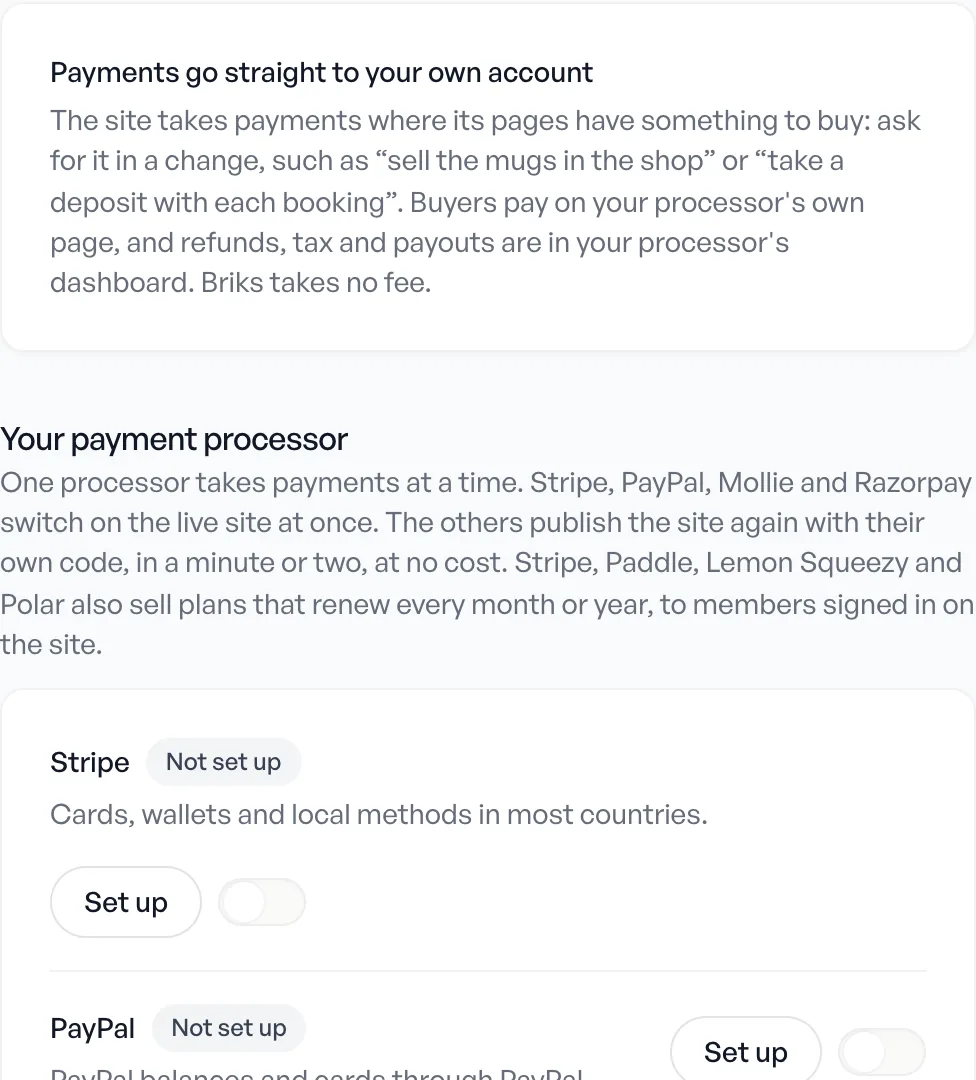
- Processors: Stripe, PayPal, Mollie or Razorpay, switched on at once with no build; or Paddle, Lemon Squeezy, Polar, Creem or Dodo Payments, which each sell as the merchant of record.
- Plans that renew, with a free trial of up to 365 days, through Stripe, Paddle, Polar or Lemon Squeezy.
- Your keys stay on your published site, never in the studio, and are tried with the processor before they are saved.
- Orders and accounts appear in the project's Database tab, where you can set a person's role to Member, Staff or Admin.
- Before publishing, Briks reads the code for keys left in files and members' records read without anyone signed in.
- Fees: Briks takes nothing from your sales; the processor's own fees apply. Payments work on every plan, and your own domain comes with Starter, $16 a month.
The step by step, with each processor's fields, is in the sign-in and payments guide.
Quick answers
Do I need to write any code?
No. You describe what people sign up for and what they pay for, then paste keys from your processor's dashboard. Builders made for developers, such as v0, write the code and expect you to connect the services.
Where does the money go?
Straight to your own processor account, then to your bank on its payout schedule. The builder does not hold it.
Can an AI-built app sell subscriptions?
Yes, through processors that support plans that renew. Check that cancelling and failed renewals are handled, not only the first payment.
Is it safe?
It can be, if secret keys never reach the browser, members' pages are checked on every request and the processor's messages are verified. Ask the builder how it handles each, and run the tests above.
Which AI app builders include payments on every plan?
By their own pages on 23 October 2026: Hostinger AI Builder and Briks. Lovable's built-in payments need Pro, Base44's need Builder, and Replit's connector needs a paid plan.
Can an AI-built app have Google sign-in?
Yes. Many builders offer Google beside email and password. You register an app in Google's own console and paste its keys into the builder.
Where to start
Pick the builder whose payment plan fits your price, describe one thing to sell and run it in test mode before anything else. To try Briks, start free with no card, or read how it builds web apps and dashboards.
Sources
- Other builders: the vendor pages listed under Sources in Best AI app builders in 2026, checked 23 October 2026
- Briks: sign-in and payments guide and pricing, checked 5 November 2026